Download Mine Survival APK 2.9.4 for Android
WILDSODA APK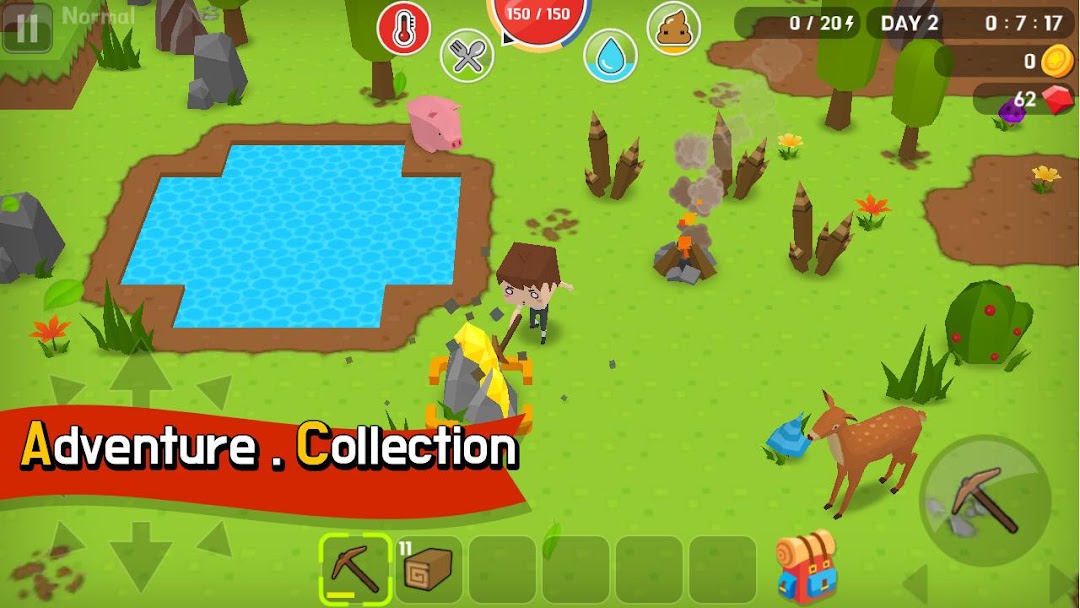
| Name | Mine Survival |
|---|---|
| Publisher | WILDSODA |
| Version | 2.9.4 |
| Size | 81MB |
| Requires | Android 5.0 |
| Get it on | Google Play ↗ |
| Category | Action |
| Downloads | 4,832 |
| Price | FREE |
| Rating |
★
★
★
★
★
3.2/5
(10)
|
| Author | |
| Updated |
Mine Survival looks like a friendly Minecraft clone, right until the first night falls, the zombies pour in, and your hunger, thirst, and body temperature all start draining at the same time.
Mine Survival is a free, offline block-survival game for Android, built by solo indie studio WILDSODA as its very first release. You gather resources, craft tools, raise walls and towers, and try to live through wave after wave of nighttime zombies. The bright pixel art makes the game look casual. The survival systems running underneath are not casual at all, and that gap is the whole reason people keep playing.
- What Is Mine Survival?
- How Mine Survival Plays: Mining, Crafting, and Surviving the Night
- Survival Stats You Have to Manage: Hunger, Thirst, Body Temperature, and Waste
- Game Modes and Difficulty: From Easy to Master
- Crafting Basics: Your First Tools, Tent, and Base
- Caves, Ores, Pets, and Late-Game Content
- Mine Survival MOD APK: What the Modded Version Changes
- How to Download and Install Mine Survival Safely
- Is Mine Survival Safe? Risks, Permissions, and Account Concerns
- Mine Survival vs Minecraft and Other Block Survival Games
- Frequently Asked Questions
- The Bottom Line
What Is Mine Survival?
Mine Survival is a 3D block-style survival and crafting game for Android, developed and published by indie developer WILDSODA under the package name com.WildSoda.MineSurvival. It plays fully offline as a single-player experience, so no account or internet connection is needed once it is installed.
The game has passed 5 million installs on Google Play as of September 2024, which is strong for a first project from a one-person studio. The download weighs roughly 100 MB. It runs on Android 7.0 (Nougat) or newer and asks for at least 768 MB of RAM, so even older budget phones can handle it. The current build is version 2.9.4, following earlier releases such as 2.7.0 in September 2024, 2.8.0 in November 2025, and 2.9.03 in February 2026.
If you have played Minecraft, the loop will feel familiar: chop, mine, craft, build, defend. Mine Survival leans harder into pure survival, though, because the daily fight to stay fed, warm, and hydrated matters as much as building a base.
How Mine Survival Plays: Mining, Crafting, and Surviving the Night
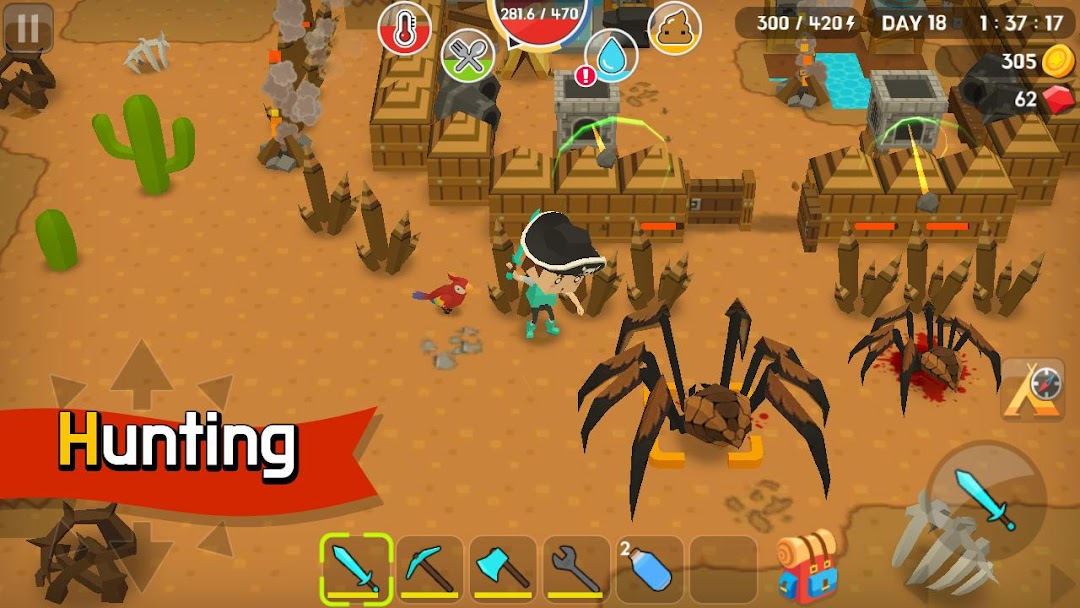
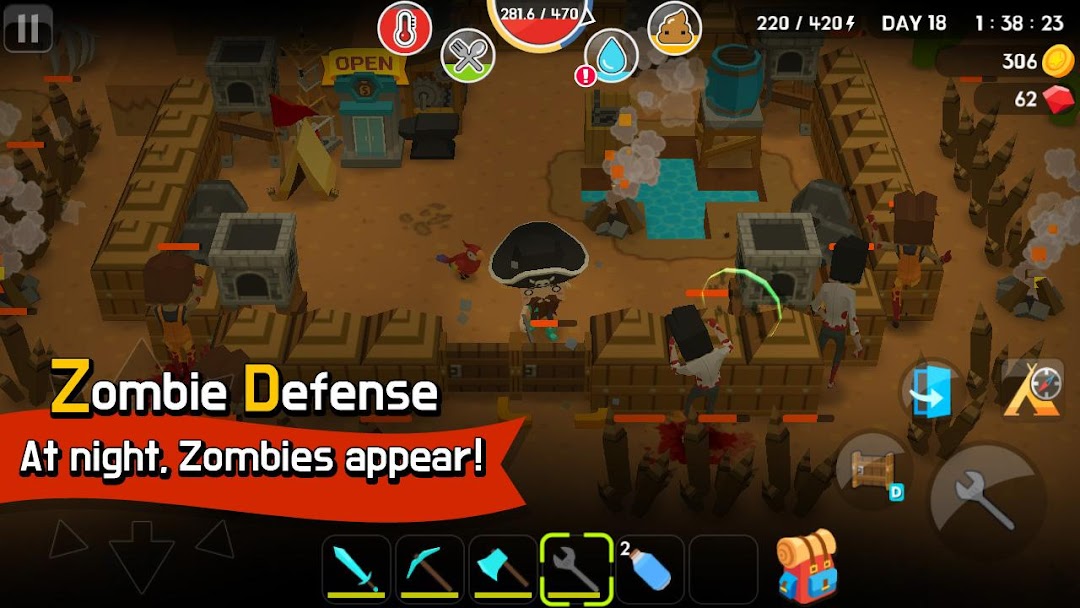
The core loop is a day-and-night cycle where daytime is for gathering and building, and night is for fighting. During the day you collect wood, stone, and ore, hunt animals, and craft the gear you need. Once the sun goes down, zombies spawn and head straight for you.
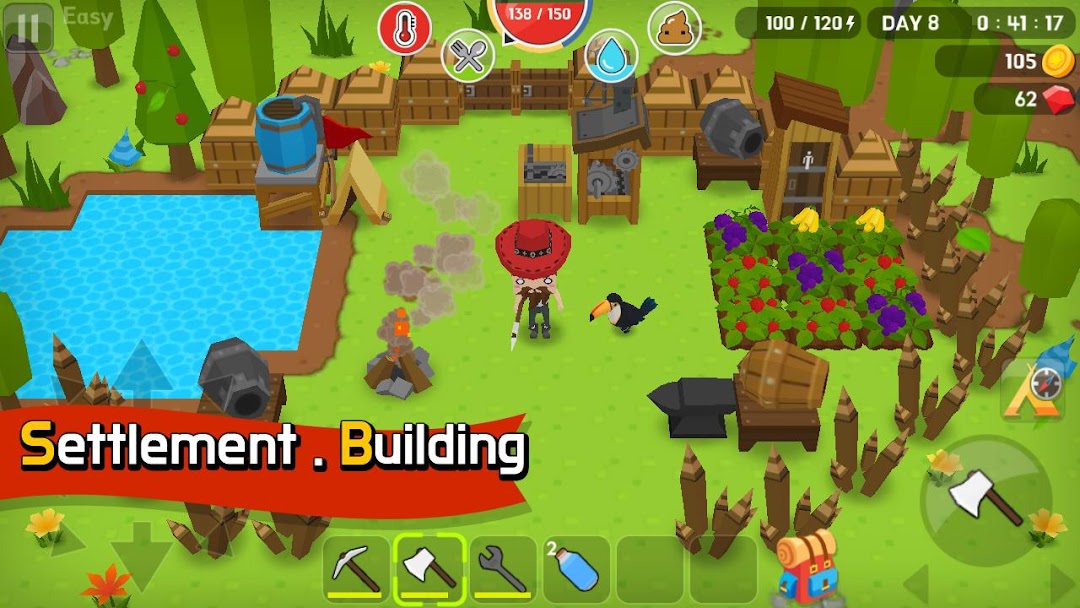
Your defense is everything you built before dark. You can wall off your settlement, set snares, and place attack towers and cannons to thin the horde before it reaches you. The 2.0.0 update added upgrade tiers for walls, doors, attack towers, cannons, traps, and power towers, so a base you keep alive for many in-game days can grow into a real fortress rather than a single fence.
Combat is simple to control but punishing if you are unprepared. A poorly defended base on a hard difficulty can fall in a single night, which is why early planning around your settlement location and resource supply is the skill that separates a long run from a quick death.
Survival Stats You Have to Manage: Hunger, Thirst, Body Temperature, and Waste
Mine Survival tracks four separate survival meters, and ignoring any one of them will kill you. You have to manage hunger, water intake, body temperature, and even your character’s waste, which is an unusual mechanic for a mobile game and a big part of why the game feels harder than it looks.
Food and water are not as simple as grabbing whatever is nearby. Eating raw meat or drinking unpurified water can hurt you, so cooking and purification become daily routines rather than afterthoughts. Body temperature pushes you toward fire, shelter, and the right clothing, and it ties directly into the Fever Zone added in the 2.0.0 update.
The practical lesson is to never let any single meter bottom out while you are busy with another task. Many new players survive the zombies just fine and then starve or freeze inside their own walls.
Game Modes and Difficulty: From Easy to Master
Mine Survival offers several difficulty modes, commonly listed as Easy, Normal, Hard, and Master, each with its own number of days you need to endure. Higher modes shorten your margin for error and make zombie waves more dangerous, so the same map feels like a different game depending on where you start.
Progression between modes is gated by a boss. You build an altar, summon the boss, and fight it, and beating it rewards a key that unlocks the next mode. This gives the game a sense of forward momentum that many open-ended survival sandboxes lack.
The 2.0.4 update also added a Custom game option, which lets you tune the experience rather than accepting fixed rules. For players who want creative freedom without jumping straight to a modded build, that custom mode is the cleanest way to relax the difficulty.
Crafting Basics: Your First Tools, Tent, and Base
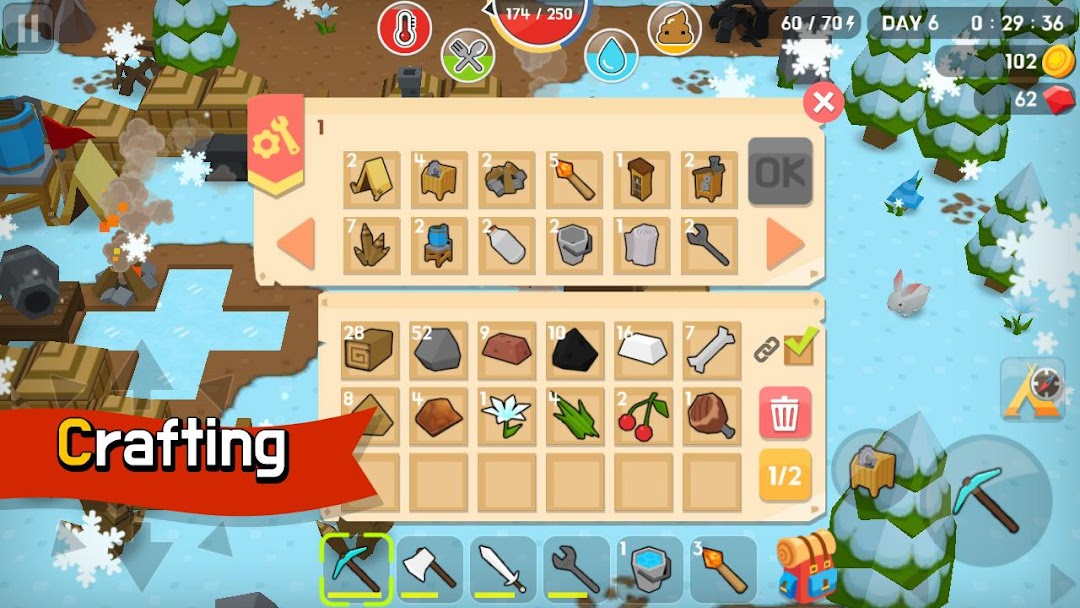
Your first goal in any run is to craft basic tools before the first night, because bare hands will not get you through it. The standard opening is to chop trees for wood, then build a crafting table, which the game makes from six blocks of wood.
From the crafting table you can produce the early essentials: a sword, an axe, and a pickaxe. Hunting animals such as pigs and deer gives you meat to cook for energy and leather for crafting. A simple starter shelter, the tent, can be built from two leather and two wood, and you should register it so the game treats it as your home base for respawning.
A good first day looks roughly like this in order:
- Gather wood and stone, then build a crafting table.
- Craft a pickaxe, an axe, and a sword.
- Hunt one or two animals for meat and leather.
- Build and register a tent as your base point.
- Put up at least a basic wall before the light fades.
Get those five things done and your first night becomes survivable. Skip the wall and you will spend night one running instead of fighting.
Caves, Ores, Pets, and Late-Game Content
The deeper game opens up underground and through collectibles, well beyond the basic build-and-defend loop. The 2.0.0 update added caves, new ores, new monsters, a Drill for faster mining, the Fever Zone, and a Unicorn, giving experienced players real reasons to keep exploring after their base is secure.
That same update introduced 30 functional pets, meaning companions that actually do something rather than just follow you around. Combined with the upgrade tiers for your defensive structures, this is where the game shifts from “survive the night” to “build an empire and dig for rare materials.”
If your early runs feel repetitive, the caves and ore progression are the part most players have not reached yet, and they are the main answer to the “what is there to do after I survive” question.
Mine Survival MOD APK: What the Modded Version Changes
A Mine Survival MOD APK is a modified copy of the game that download sites advertise with unlocked or boosted features the official version does not include. The original game is already free, so the mods are aimed at removing friction rather than removing a paywall.
Across the download pages that distribute these files, the commonly listed mod features include unlimited money or coins, unlocked characters and maps, removed pop-up ads, god mode or invincibility, free crafting without the required resources, removed survival needs such as hunger and cold, and speed boosts. Some pages also mention a save editor.
It is worth being honest about what those changes do. The survival meters, the resource grind, and the threat of a base falling at night are the entire point of Mine Survival. Turning on god mode and infinite resources can be fun for an afternoon of free building, but it removes the tension that makes the original game worth playing. Many people who install a mod for “more fun” end up bored within a day, because there is nothing left to survive.
How to Download and Install Mine Survival Safely
The safest way to get Mine Survival is straight from Google Play, where the file is signed by WILDSODA and updated automatically. If you choose to install an APK from outside the Play Store instead, you are sideloading, which means manually allowing your phone to install a file your system did not vet.
Standard sideloading works like this:
- Download the APK from the source you have chosen.
- Open Settings, then Security or Apps and special access, and turn on “Install unknown apps” for your browser or file manager.
- Open the downloaded file and follow the install prompts.
- Switch “Install unknown apps” back off as soon as the install finishes.
Two things are worth knowing before you tap install. Google Play Protect will often flag any APK from outside the store, which is a normal warning for all third-party installs and not proof a specific file is malicious. And a modded build will usually have a different package name and signature than the official app, so it can install alongside the Play Store version rather than updating it.
If you would rather skip the guesswork and browse files that have already been organized and checked, you can start from our library instead of a random search result.
Browse More Games & Apps on MODLMH →
Is Mine Survival Safe? Risks, Permissions, and Account Concerns
The official Mine Survival app on Google Play is safe to install, and a scan of version 2.9.4 on a major mirror showed no security vendors flagging it as malicious as of March 2026. The real risk is not the game itself but where you get it, especially when you go looking for a modded build.
APK files from unknown websites are the single most common way Android malware spreads. A file labeled as Mine Survival can be repackaged with hidden adware, trackers, or worse, and a “free unlimited money” promise is exactly the bait that hides those payloads. Because Mine Survival is offline and single-player, there is no account login to steal, which lowers the stakes compared to modded social or banking-linked apps. The download itself is still the part you have to be careful about.
There is also the matter of respecting the developer. WILDSODA is an indie creator who built this as a first game and funds future updates partly through ads. Stripping those ads with a mod directly removes that support. If you enjoy the game, the fairest move is to play the official version and let the ads run, or simply use the in-game custom mode if you want an easier experience.
Mine Survival vs Minecraft and Other Block Survival Games
Mine Survival sits in the same family as Minecraft but pulls the genre toward hardcore survival rather than open-ended building. Minecraft is closer to a creative construction sandbox with survival attached, while Mine Survival is a pure survival game first, with crafting in service of staying alive. The body-temperature, thirst, and waste systems are heavier here than in most Minecraft-style mobile games.
Against other free block survivors, the trade-offs are clear. LostMiner offers a 2D side-view world with destructible terrain and local multiplayer, so it is the better pick if you want co-op or a classic side-scroller feel. X Survive leans into a grittier, more realistic sandbox with a larger open world and deeper building. Mine Survival’s edge is its lightweight size, its full offline play, and its tight base-defense loop against nightly zombies.
Choose Mine Survival if you want a small, offline survival challenge that runs on modest hardware. Pick Minecraft for unlimited creative building and multiplayer, or LostMiner if you specifically want to play with a friend on the same network.
Frequently Asked Questions
Is Mine Survival free to play?
Yes. The official game on Google Play is free and supported by ads, with no required purchase to access the full survival experience.
Does Mine Survival work offline?
Yes. It is a single-player, offline game, so you can play on a flight or with no signal once it is installed.
Does Mine Survival have multiplayer?
No. As of mid-2026 it is single-player only, and multiplayer is one of the most requested features in player reviews rather than something the game currently offers.
Is Mine Survival the same as Minecraft?
No, although it is openly inspired by Minecraft’s block style. Mine Survival is a tighter, harder survival game with its own systems for hunger, thirst, body temperature, waste, and nightly zombie defense.
What Android version do I need?
You need Android 7.0 (Nougat) or newer and at least 768 MB of RAM. The install size is around 100 MB.
Is the Mine Survival MOD APK safe?
A modded APK is only as safe as the site you download it from. Files from unknown sources can carry malware, and the official free version avoids that risk entirely. The mod also strips out the survival challenge that makes the game worth playing, so for most people the official build is the better choice.
The Bottom Line
Mine Survival earns its 5 million-plus installs by being a deceptively tough survival game in a friendly pixel shell, with crafting, base defense, and four survival meters that punish carelessness. The official free version on Google Play is the safest way to play, runs on almost any Android 7.0 phone, and respects the indie developer who keeps updating it through builds like 2.9.4. If you want an easier run, use the in-game custom mode rather than chasing a modded APK from an unknown site. New players should focus on one thing first: get a crafting table, a basic toolset, and a wall up before your first night, and the rest of the game opens up from there.
Vô Hạn Ngọc
Install the official, unmodified build straight from Google Play.
Android emulator to run MINE SURVIVAL APK smoothly on PC.
Choose the source that fits your device
Mine Survival
Original build on Google Play · Android
GET ↗
Play on PC with LDPlayer
Android emulator · supports Mine Survival · Windows
GET ↗